Routely: Your Route, Your Way

Overview

Overview

Trip planning usually begins with excitement, then quickly becomes overwhelming. Between switching apps, comparing routes, and sorting through too many options, finding the best plan can feel harder than the trip itself. Routely solves this by simplifying the process into one clear experience where travelers can compare choices, plan faster, and book with confidence.

Trip planning usually begins with excitement, then quickly becomes overwhelming. Between switching apps, comparing routes, and sorting through too many options, finding the best plan can feel harder than the trip itself. Routely solves this by simplifying the process into one clear experience where travelers can compare choices, plan faster, and book with confidence.

Trip planning usually begins with excitement, then quickly becomes overwhelming. Between switching apps, comparing routes, and sorting through too many options, finding the best plan can feel harder than the trip itself. Routely solves this by simplifying the process into one clear experience where travelers can compare choices, plan faster, and book with confidence.

Challenge

Challenge

Traveling across Europe by bus sounds simple, but with dozens of separate operators, each with their own website and booking system, finding and comparing options quickly becomes overwhelming. International travelers are left juggling multiple tabs, deciphering foreign websites, and guessing at local boarding procedures. There's no single place to just search, book, and go.

Research Analysis

Research Analysis

Pain Point #1

Confusing booking and boarding instructions across different bus carriers.

Confusing booking and boarding instructions across different bus carriers.

Pain Point #2

Pain Point #2

Pain Point #2

Unreliable real-time updates for delays and cancellation.

Unreliable real-time updates for delays and cancellation.

Pain Point #3

Pain Point #3

Pain Point #3

Lack of clarity at stations in unfamiliar or international locations.

Lack of clarity at stations in unfamiliar or international locations.

Synthesizing key insights led to a simple, centralized app that makes booking for public transportation stress-free.

Synthesizing key insights led to a simple, centralized app that makes booking for public transportation stress-free.

Routely Process

Routely Process

Mapping out the information architecture early on was crucial to Routely's design process because it clarified exactly what users needed first. Which is a clear step-by-step guidance, real-time alerts, and consistent information across all carriers
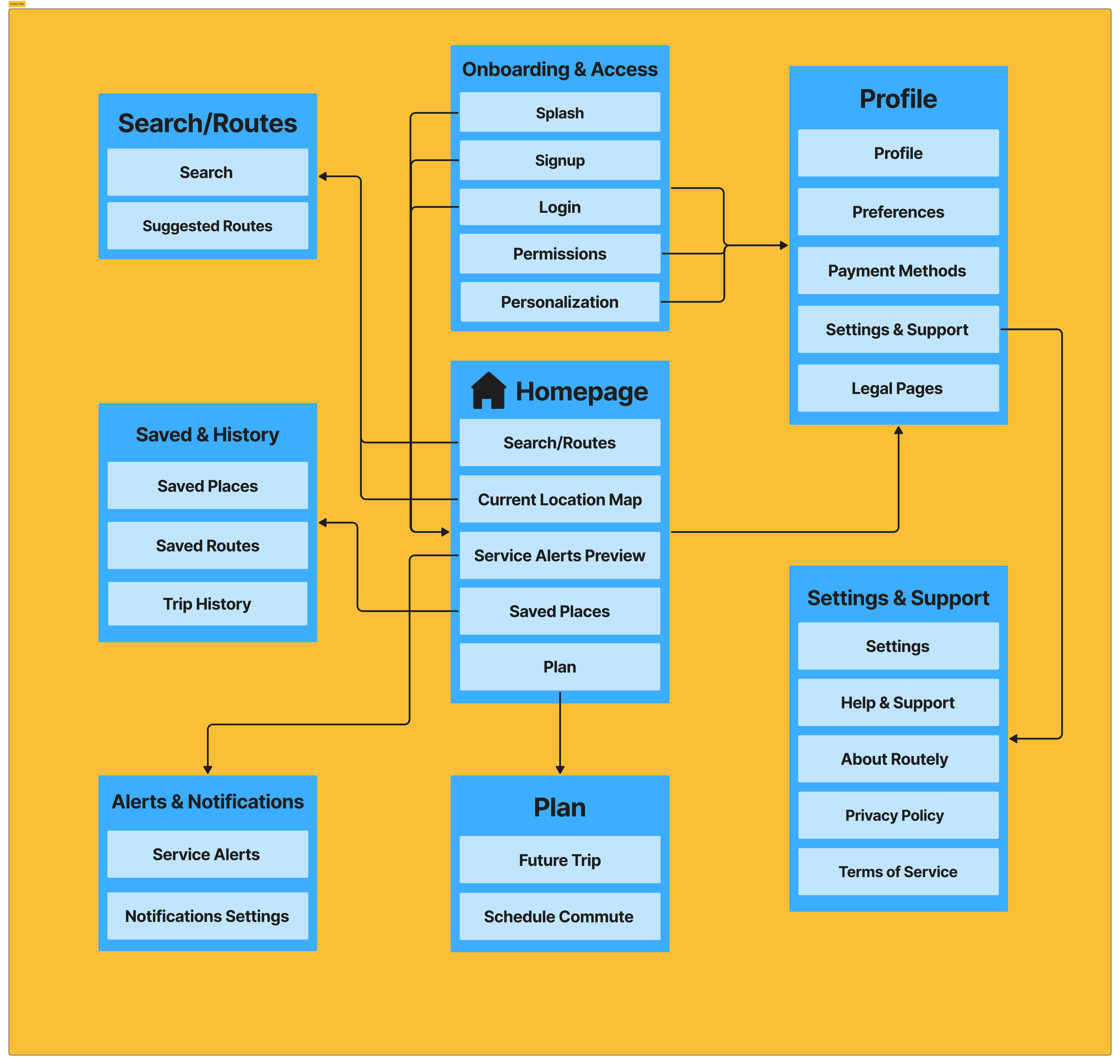
The core actions flow was designed to reduce decision fatigue at every step by surfacing familiar routes upfront, ranking results by best fit, and collapsing complexity into a single linear path from selection to confirmation.
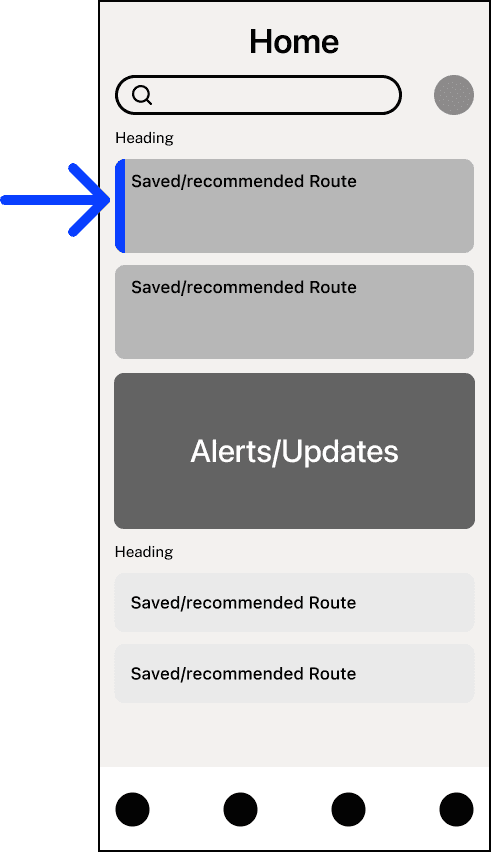
  1. Surfaced saved routes

  1. Surfaced saved routes

  1. Surfaced saved routes

Saved routes was given a homepage shortcut for returning users who rely on familiar destinations, so surfacing that quickly makes the experience feel personal from the start

Saved routes was given a homepage shortcut for returning users who rely on familiar destinations, so surfacing that quickly makes the experience feel personal from the start

Saved routes was given a homepage shortcut for returning users who rely on familiar destinations, so surfacing that quickly makes the experience feel personal from the start

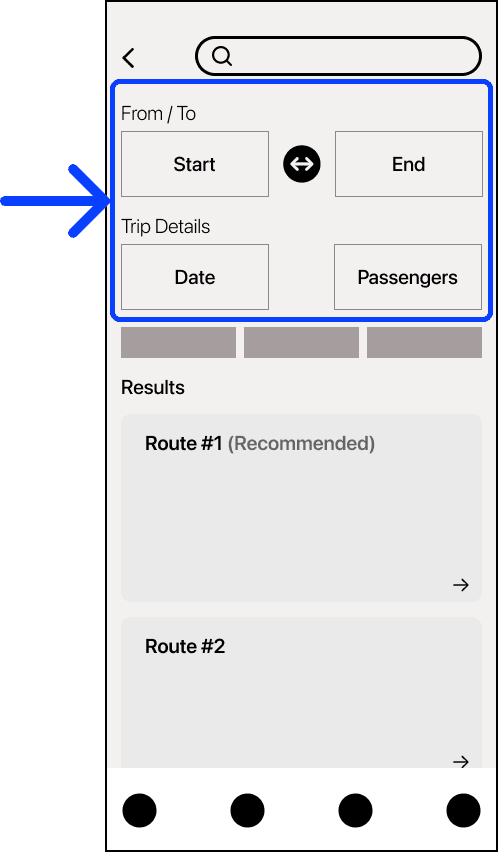
  1. Refine, not restart

  1. Refine, not restart

  1. Refine, not restart

The search inputs sit directly above results so users can adjust origin, destination, date, or passengers without losing context or navigating back.

The search inputs sit directly above results so users can adjust origin, destination, date, or passengers without losing context or navigating back.

The search inputs sit directly above results so users can adjust origin, destination, date, or passengers without losing context or navigating back.

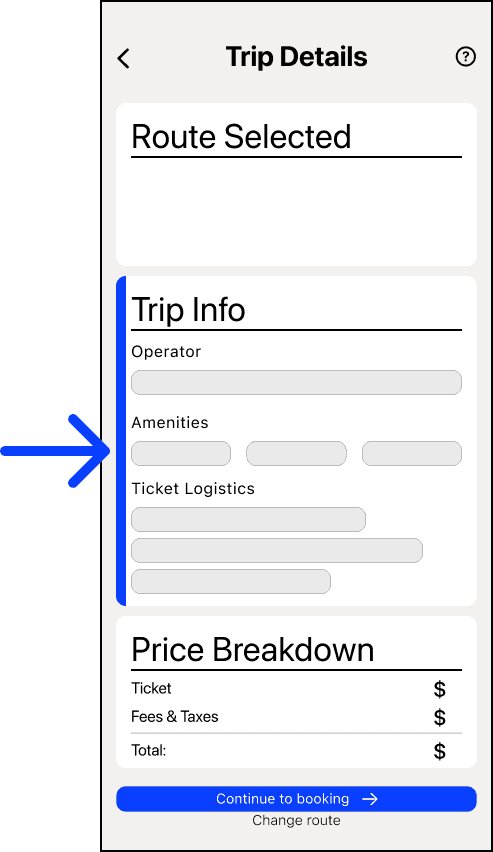
  1. Trip Info: one card, three questions

  1. Trip Info: one card, three questions

  1. Trip Info: one card, three questions

With all three sub-sections in this info card, users are able to see the exact information they should know before committing to a ride.


Showing the operator before the price was so that trust in the operator is established on its own terms, and not as an afterthought once a cost is already on screen.


The tile format exists for amenities because a user can just scan and move on in under a second.


Ticket logistics play as the anxiety-reducing layer and is placed right before pricing so it lands as reassurance before the fine print.

With all three sub-sections in this info card, users are able to see the exact information they should know before committing to a ride.


Showing the operator before the price was so that trust in the operator is established on its own terms, and not as an afterthought once a cost is already on screen.


The tile format exists for amenities because a user can just scan and move on in under a second.


Ticket logistics play as the anxiety-reducing layer and is placed right before pricing so it lands as reassurance before the fine print.

With all three sub-sections in this info card, users are able to see the exact information they should know before committing to a ride.


Showing the operator before the price was so that trust in the operator is established on its own terms, and not as an afterthought once a cost is already on screen.


The tile format exists for amenities because a user can just scan and move on in under a second.


Ticket logistics play as the anxiety-reducing layer and is placed right before pricing so it lands as reassurance before the fine print.

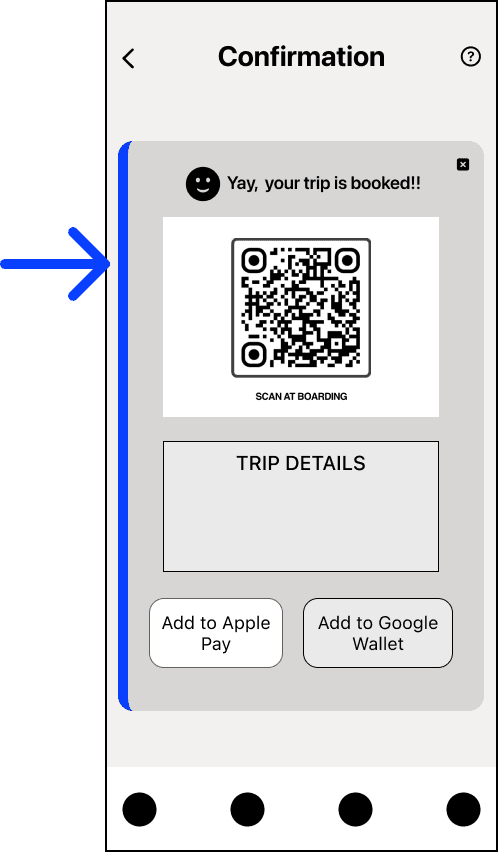
  1. Making travel more seamless

  1. Making travel more seamless

  1. Making travel more seamless

Adding a QR-based ticketing system simplifies the boarding experience, reduces confusion at stations, and gives users a faster way to access their trip information.

Adding a QR-based ticketing system simplifies the boarding experience, reduces confusion at stations, and gives users a faster way to access their trip information.

Adding a QR-based ticketing system simplifies the boarding experience, reduces confusion at stations, and gives users a faster way to access their trip information.

Real-time Planning

Real-time Planning

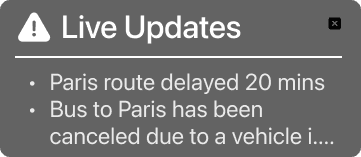
One challenge I ran into was figuring out the best format for the live updates feature, which is the part of the app that surfaces real-time delays, cancellations, and service alerts.


My initial instinct was to consolidate all alerts into a single card because I thought it would feel cleaner and save users from having to scroll through a long list. Looking back, I was designing more for visual tidiness than for actual usability.


As I sat with it more, I realized the real question wasn't 'how do I make this look clean?' instead it was 'how do I make this information easy to digest at a glance?' When someone is rushing to catch a bus/train, they don't need a tidy card, they need to immediately spot what's relevant to their trip.
Before

Before

Before

After

After

After

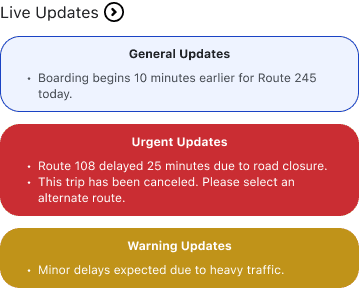
The redesign separates alerts into three color-coded tiers: General, Urgent, and Warning so that users can triage at a glance without reading a single word.


The core insight was that alerts aren't just information, they're decisions. Commuters don't have time to parse bullet points mid-rush, they need the app to prioritize for them. Building urgency into the visual hierarchy does exactly that.

Testing

Testing

Before

Before

Before

After

After

After

The map feature was split into its own screen because once you've booked, your needs completely change; you're no longer searching, you're traveling. So the design shifted to match that. Named pins so you can actually see your route at a glance, live tracking so you're not left wondering where the bus is, and a big "time remaining" bar because that's the one thing everyone wants to know once they're on board.

Results

Results

The following is Routely's core flows through the final product screens showing what users can do.

The following is Routely's core flows through the final product screens showing what users can do.

Home Screen

Home Screen

Home Screen


  • Saved routes are surfaced immediately on launch, reducing the need to search from scratch each time

  • A live updates panel using color coded urgency levels so users can act on delays or cancellations at a glance

  • Saved and recent routes are accessible directly from the home screen for quick repeat bookings

Search & Filter

Search & Filter

Search & Filter


  • The search bar accepts routes, cities, or stations and returns results dynamically as users type

  • From / To fields with a swap button let users reverse a route without re-entering details

  • Sort By, Filter, and Category controls let users narrow down results by price, time, and amount of transfers surfacing the most relevant trip options at the top

Route & Trip Details

Route & Trip Details

Route & Trip Details


  • Departure and arrival times, duration, origin and destination stops, and seat availability are all shown in one view

  • Operator and trip info (Wi-Fi, power outlets, restrooms) is surfaced as icons so users can evaluate comfort before booking

  • An e-ticket availability badge confirms users won't need to print anything physically

Live Map Tracking

Live Map Tracking

Live Map Tracking


  • Displaying the active route between two cities with a real-time position indicator for users to always know where their bus is

  • A persistent status bar at the bottom at a glance without interrupting the map

  • This screen distinguishes Routely from basic ticketing apps by extending utility beyond the point of purchase

Profile & Account Management

Profile & Account Management

Profile & Account Management


  • Upcoming trip with its necessary QR code is accessible directly from the profile, giving users a dashboard view of their travel history and plans

  • A rewards tracker (220 pts) gamifies repeat usage and gives users a reason to stay loyal to the platform

  • Settings are organized clearly so users can update any detail without hunting through nested menus

Reflections & Learnings

Reflections & Learnings

#1. Designing for emotion, not just function

Starting with "What is the user feeling in this moment?" rather than jumping straight to layouts fundamentally changed how I approach every project. This shift has made me a more intentional designer and one who considers emotional impact before visual execution, ensuring the experience resonates on a human level, not just a functional one.

Starting with "What is the user feeling in this moment?" rather than jumping straight to layouts fundamentally changed how I approach every project. This shift has made me a more intentional designer and one who considers emotional impact before visual execution, ensuring the experience resonates on a human level, not just a functional one.

#2. Systems thinking from day one

#2. Systems thinking from day one

#2. Systems thinking from day one

Building Routely's design system from scratch pushed me to think about components, states, and reusability before I even touched a full screen. Accessibility stopped feeling like a checklist and started feeling like a design tool — using hierarchy and contrast to create clarity users could actually feel. I now think more carefully about how every decision holds up over time, not just in the moment.

Building Routely's design system from scratch pushed me to think about components, states, and reusability before I even touched a full screen. Accessibility stopped feeling like a checklist and started feeling like a design tool — using hierarchy and contrast to create clarity users could actually feel. I now think more carefully about how every decision holds up over time, not just in the moment.

#3. Restraint is a design decision

#3. Restraint is a design decision

#3. Restraint is a design decision

Choosing clarity over decoration was the most important decision I made on this project. Leaning into spacing, hierarchy, and restraint instead of making it bold and flashy taught me that holding back is its own skill. I now see restraint as something that separates intentional design from surface-level polish.

Choosing clarity over decoration was the most important decision I made on this project. Leaning into spacing, hierarchy, and restraint instead of making it bold and flashy taught me that holding back is its own skill. I now see restraint as something that separates intentional design from surface-level polish.